
While it's not possible to create global groups for your school or trust to see it is possible to create your own groups of people.
To do this:
- In Outlook, in the bottom left, click on the icon of two people
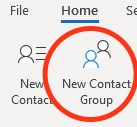
- Now in the menu bar at the top click on New Contact Group
- Give the group a name in the NAME box
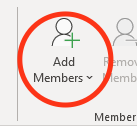
- Click on Add Members button at the top
-
- Select From Address Book
- Find each person in turn and double click on them until you have all the people
- Click on OK
- Once complete click on Save and Close in the top left

Comments
0 comments
Please sign in to leave a comment.